
API Academy
🌐 English
  • 🌐 English
  • 🌐 繁體中文
HomePetstore APIExplore more APIs
🌐 English
  • 🌐 English
  • 🌐 繁體中文
🌐 English
  • 🌐 English
  • 🌐 繁體中文
  1. Developing APIs
  • Introduction
  • Table of Contents
  • API Academy
    • Get Started
      • What is an API?
      • How Does an API Work?
      • How to Call an API?
      • How to Read an API Documentation?
      • Chapter Summary
      • Get realtime weather
    • API Fundamentals
      • API Funtamentals: Overview
      • Method & Path
      • Parameters
      • Request Body
      • Responses
      • API Specification & OAS
      • Chapter Summary
    • Working with APIs
      • Working with APIs: Overview
      • Making Requests from Spec
      • Environments and Variables
      • Chaining Multiple Endpoints
      • Handling Authentication
      • Handling API Signatures
      • Introduction to Scripts
      • Chapter Summary
    • Mocking APIs
      • Mocking APIs: Overview
      • Smart Mock
      • Mock Expectations
      • Cloud Mock
      • Mock Scripts
      • Chapter Summary
    • Designing APIs
      • Designing APIs: Overview
      • Introduction to API Design
      • Creating Your First API Project
      • Analyzing Requirements and Planning Your API
      • Designing Data Models
      • Designing Endpoints
      • Using Components and Reusability
      • Setting Up Authentication
      • API Design Guidelines
      • Chapter Summary
    • Developing APIs
      • Developing APIs: Overview
      • Setup: Install Your AI Coding Assistant
      • Quick Start: From Spec to Running API in 30 Minutes
      • Understanding the Generated Code
      • Testing Your API with Apidog
      • Deployment: Put Your API Online
      • Chapter Summary
    • Testing APIs
      • Testing APIs: Overview
      • Getting Started: Your First Test Scenario
      • Integration Testing and Data Passing
      • Dynamic Values
      • Assertions and Validations
      • Flow Control: If, For, ForEach
      • Data-Driven Testing
      • Performance Testing
      • Test Reports and Analysis
      • CI/CD Integration
      • Scheduled Tasks and Automation
      • Advanced Testing Strategies
      • Chapter Summary
    • API Documentations
      • API Documentations: Overview
      • Publishing Your First API Doc
      • Customizing Documentation Appearance
      • Interactive Features for Consumers
      • Advanced Publishing Settings
      • Managing API Versions
      • Chapter Summary
    • Advanced API Technologies
      • API Technologies: Overview
      • GraphQL
      • gRPC
      • WebSocket
      • Socket.IO
      • Server-Sent Events (SSE)
      • SOAP
      • Chapter Summary
    • API Lifecycle
      • API Lifecycle: Overview
      • Stages of the API Lifecycle
      • API Governance
      • API Security Best Practices
      • Monitoring and Analytics
      • API Versioning Strategies
      • The Future of APIs
      • Chapter Summary
    • API Security
      • API Security: Overview
      • API Security Fundamentals
      • Authentication vs Authorization
      • Understanding OAuth 2.0 and OpenID Connect
      • JSON Web Tokens (JWT)
      • OWASP API Security Top 10
      • Encryption and HTTPS
      • Chapter Summary
    • API Tools
      • API Tools: Overview
      • The Evolution of API Tools
      • API Clients
      • Command Line Tools (cURL, HTTPie)
      • API Design and Documentation Tools
      • API Mocking Tools
      • API Testing Tools
      • All-in-One API Platforms
      • Chapter Summary
    • API Gateway
      • API Gateway: Overview
      • What is an API Gateway?
      • Key Features of API Gateways
      • API Gateway vs Load Balancer vs Service Mesh
      • Popular API Gateway Solutions
      • The BFF (Backend for Frontend) Pattern
      • Chapter Summary
  • Modern Pet Store
    • Pet
      • Get Pet
      • Update Pet
      • Delete Pet
      • Create Pet
      • List Pets
      • Upload Pet Image
    • User
      • Update User
      • Get User
      • Delete User
      • Login
      • Logout
      • Create User
    • Store
      • List Inventory
      • Create Order
      • Get Order
      • Delete Order
      • Callback Example
      • Pay for an Order
    • Payments
      • Pay Order
    • Chat
      • Create Chat Completion
    • Webhooks
      • Pet Adopted Event
      • New Pet Available Event
  • Schemas
    • Pet
    • Category
    • User
    • ApiResponse
    • OrderPayment
    • Tag
    • Order
    • Links-Order
    • PetCollection
    • Bank Card
    • Bank Account
    • Links
    • Error
HomePetstore APIExplore more APIs
🌐 English
  • 🌐 English
  • 🌐 繁體中文
🌐 English
  • 🌐 English
  • 🌐 繁體中文
  1. Developing APIs

Testing Your API with Apidog

You have a working API. You understand how the code works. Now it's time to make sure everything actually works correctly - and Apidog's AI can help you test it thoroughly without writing test cases manually.
In this chapter, you'll learn how to use Apidog's AI features to automatically generate comprehensive test cases for your API, covering positive tests, negative tests, boundary cases, and security checks.

Before You Start: Enable AI Features#

Apidog's AI features need to be enabled first. These features are free to use, but they require your own AI model API key (from Claude, OpenAI, or Gemini).
Enable AI features:
1.
Go to Settings β†’ AI Features
2.
Toggle Enable AI Features to ON
3.
Click + Add Provider to configure your AI model
Configure AI Features
Configure your AI provider:
Choose one of these providers and enter your API key:
Add Provider
Anthropic (Claude) - Recommended for best results
OpenAI (GPT-4)
Google AI Studio (Gemini)
Custom API (if using other providers)
Configure API Key
Enter your API key and click Test to verify it works. If you don't have an API key yet:
Anthropic (Claude): Get one at console.anthropic.com
OpenAI (GPT-4): Get one at platform.openai.com
Google (Gemini): Get one at aistudio.google.com
Once configured, you'll see AI options throughout Apidog.

Setting Up Your Local Environment#

Make sure your API is running locally:
You should see:
INFO:     Uvicorn running on http://127.0.0.1:8000
INFO:     Application startup complete.
In Apidog, create a Local environment:
1.
Click Environments in the sidebar
2.
+ New Environment
3.
Name: "Local Development"
4.
Base URL: http://localhost:8000
5.
Save and switch to this environment
Now Apidog will send requests to your local API for testing.

Your First Manual Test#

Before using AI, let's do one manual test so you understand what we're automating.
Test: Create a user
1.
Open the POST /users endpoint in Apidog
2.
Go to the Body tab
3.
Enter test data:
{
  "email": "alice@example.com",
  "firstName": "Alice",
  "lastName": "Smith",
  "password": "SecurePass123",
  "phone": "+14155551234"
}
4.
Click Send
5.
Check the response:
Status code: 201 Created
Response includes id, email, firstName, createdAt
Response does NOT include password
That works. But what about edge cases? Invalid email? Missing fields? Duplicate email? You'd have to manually test all those scenarios.
This is where AI helps.

Generate Test Cases with AI#

Instead of manually creating test cases for every possible scenario, let Apidog's AI generate them for you.
On the POST /users endpoint:
1.
Click the Test Cases tab
2.
Click Generate with AI button
Generate with AI
A panel slides out on the right with options.
Select test case categories:
Check the types of tests you want:
βœ“ Positive tests - Valid inputs that should succeed
βœ“ Negative tests - Invalid inputs that should fail properly
βœ“ Boundary tests - Edge cases (empty strings, very long values, etc.)
βœ“ Security tests - SQL injection attempts, XSS, etc.
Select Test Categories
Configure credentials (if needed):
If your endpoint requires authentication, you can configure credentials here:
Configure Credentials
Add custom requirements:
In the text box at the bottom, you can add specific requirements to guide the AI:
Generate test cases that:
- Test duplicate email registration
- Test invalid email formats
- Test missing required fields
- Verify password is never returned in responses
- Test phone number format validation
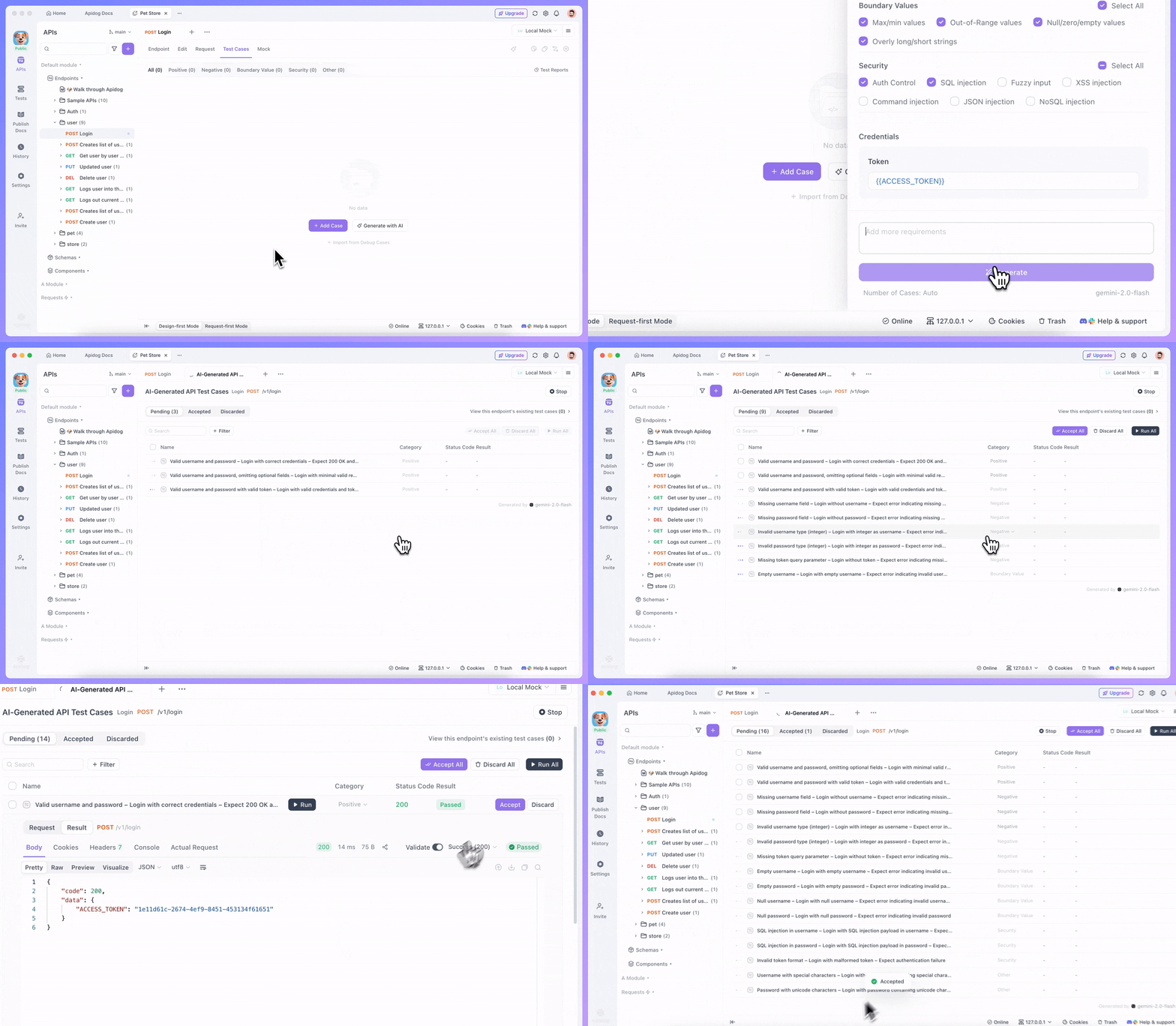
Add Requirements and Configure
Configure generation:
Set number of test cases: Up to 80 (try 20-30 for this endpoint)
Choose your AI model (if you configured multiple)
Click Generate and watch the AI work:
AI Generating Test Cases
The AI analyzes your endpoint specification and generates comprehensive test cases.

Understanding Generated Test Cases#

After generation completes, you'll see a list of test cases organized by category.
Positive Test Cases:
1.
Create user with all valid fields
Valid email, firstName, lastName, password
Expects: 201 status, user object returned, no password in response
2.
Create user without optional fields
Only required fields (email, firstName, lastName, password)
No phone number or preferences
Expects: 201 status, optional fields null or omitted
Negative Test Cases:
3.
Create user with invalid email format
Email: "not-an-email"
Expects: 422 status, validation error message
4.
Create user with missing required field
Missing firstName
Expects: 422 status, error indicating missing field
5.
Create user with duplicate email
Email that already exists
Expects: 400 status, error about duplicate email
Boundary Test Cases:
6.
Create user with very long email (255+ characters)
Tests email length limits
Expects: 422 status or truncation
7.
Create user with empty string for firstName
Tests empty value handling
Expects: 422 status, validation error
Security Test Cases:
8.
Create user with SQL injection in email
Email: admin'--@example.com
Expects: Properly escaped, no SQL injection
9.
Create user with XSS attempt in firstName
firstName: <script>alert('xss')</script>
Expects: Properly sanitized or escaped
The AI generated all these based on your endpoint specification and common API testing patterns.

Running and Managing Test Cases#

For each generated test case, you can review, run, and manage them:
Test Case Management
Review a test case:
Click to expand and see request parameters, body, and expected response
You can rename it or adjust its category
Run it:
Click Run to execute the test against your local API
Apidog shows actual vs expected results
Response times are measured automatically
Accept good test cases:
If a test case is useful and passes correctly, click Accept
It gets saved to your Test Cases tab permanently
Discard irrelevant ones:
Some generated tests might not apply to your API
Click Discard to remove them
Bulk actions:
Select multiple test cases
Run, accept, or discard them all at once
This lets you quickly curate the best tests from the AI-generated batch.

What You've Learned#

You now know how to:
Enable and configure AI features in Apidog
Generate comprehensive test cases automatically using AI
Select appropriate test categories (positive, negative, boundary, security)
Customize test generation with specific requirements
Run and manage AI-generated tests
Build test coverage without writing tests manually
The same process works for all your other endpoints (POST /user/login, GET /users/{id}, PUT /users/{id}, DELETE /users/{id}). Just open each endpoint, click "Generate with AI," select your test categories, and let the AI create comprehensive tests.
Most importantly, you can thoroughly test your API without spending hours writing test cases. The AI understands API testing patterns and generates relevant tests from your endpoint specifications.

What's Next#

Your API is tested and you know it works correctly. Now it's time to prepare it for production deployment.
Continue with β†’ Deployment
We'll deploy your API to a real server so it's accessible online, not just on your local machine.
Modified atΒ 2025-12-29 10:42:25
Previous
Understanding the Generated Code
Next
Deployment: Put Your API Online
Built with