API Academy
🌐 English
  • 🌐 English
  • 🌐 繁體中文
HomePetstore APIExplore more APIs
🌐 English
  • 🌐 English
  • 🌐 繁體中文
🌐 English
  • 🌐 English
  • 🌐 繁體中文
  1. API Tools
  • Introduction
  • Table of Contents
  • API Academy
    • Get Started
      • What is an API?
      • How Does an API Work?
      • How to Call an API?
      • How to Read an API Documentation?
      • Chapter Summary
      • Get realtime weather
    • API Fundamentals
      • API Funtamentals: Overview
      • Method & Path
      • Parameters
      • Request Body
      • Responses
      • API Specification & OAS
      • Chapter Summary
    • Working with APIs
      • Working with APIs: Overview
      • Making Requests from Spec
      • Environments and Variables
      • Chaining Multiple Endpoints
      • Handling Authentication
      • Handling API Signatures
      • Introduction to Scripts
      • Chapter Summary
    • Mocking APIs
      • Mocking APIs: Overview
      • Smart Mock
      • Mock Expectations
      • Cloud Mock
      • Mock Scripts
      • Chapter Summary
    • Designing APIs
      • Designing APIs: Overview
      • Introduction to API Design
      • Creating Your First API Project
      • Analyzing Requirements and Planning Your API
      • Designing Data Models
      • Designing Endpoints
      • Using Components and Reusability
      • Setting Up Authentication
      • API Design Guidelines
      • Chapter Summary
    • Developing APIs
      • Developing APIs: Overview
      • Setup: Install Your AI Coding Assistant
      • Quick Start: From Spec to Running API in 30 Minutes
      • Understanding the Generated Code
      • Testing Your API with Apidog
      • Deployment: Put Your API Online
      • Chapter Summary
    • Testing APIs
      • Testing APIs: Overview
      • Getting Started: Your First Test Scenario
      • Integration Testing and Data Passing
      • Dynamic Values
      • Assertions and Validations
      • Flow Control: If, For, ForEach
      • Data-Driven Testing
      • Performance Testing
      • Test Reports and Analysis
      • CI/CD Integration
      • Scheduled Tasks and Automation
      • Advanced Testing Strategies
      • Chapter Summary
    • API Documentations
      • API Documentations: Overview
      • Publishing Your First API Doc
      • Customizing Documentation Appearance
      • Interactive Features for Consumers
      • Advanced Publishing Settings
      • Managing API Versions
      • Chapter Summary
    • Advanced API Technologies
      • API Technologies: Overview
      • GraphQL
      • gRPC
      • WebSocket
      • Socket.IO
      • Server-Sent Events (SSE)
      • SOAP
      • Chapter Summary
    • API Lifecycle
      • API Lifecycle: Overview
      • Stages of the API Lifecycle
      • API Governance
      • API Security Best Practices
      • Monitoring and Analytics
      • API Versioning Strategies
      • The Future of APIs
      • Chapter Summary
    • API Security
      • API Security: Overview
      • API Security Fundamentals
      • Authentication vs Authorization
      • Understanding OAuth 2.0 and OpenID Connect
      • JSON Web Tokens (JWT)
      • OWASP API Security Top 10
      • Encryption and HTTPS
      • Chapter Summary
    • API Tools
      • API Tools: Overview
      • The Evolution of API Tools
      • API Clients
      • Command Line Tools (cURL, HTTPie)
      • API Design and Documentation Tools
      • API Mocking Tools
      • API Testing Tools
      • All-in-One API Platforms
      • Chapter Summary
    • API Gateway
      • API Gateway: Overview
      • What is an API Gateway?
      • Key Features of API Gateways
      • API Gateway vs Load Balancer vs Service Mesh
      • Popular API Gateway Solutions
      • The BFF (Backend for Frontend) Pattern
      • Chapter Summary
  • Modern Pet Store
    • Pet
      • Get Pet
      • Update Pet
      • Delete Pet
      • Create Pet
      • List Pets
      • Upload Pet Image
    • User
      • Update User
      • Get User
      • Delete User
      • Login
      • Logout
      • Create User
    • Store
      • List Inventory
      • Create Order
      • Get Order
      • Delete Order
      • Callback Example
      • Pay for an Order
    • Payments
      • Pay Order
    • Chat
      • Create Chat Completion
    • Webhooks
      • Pet Adopted Event
      • New Pet Available Event
  • Schemas
    • Pet
    • Category
    • User
    • ApiResponse
    • OrderPayment
    • Tag
    • Order
    • Links-Order
    • PetCollection
    • Bank Card
    • Bank Account
    • Links
    • Error
HomePetstore APIExplore more APIs
🌐 English
  • 🌐 English
  • 🌐 繁體中文
🌐 English
  • 🌐 English
  • 🌐 繁體中文
  1. API Tools

API Design and Documentation Tools

If you follow the Design-First approach (which you should), you need tools that are specifically built for authoring and visualizing API specifications. The ecosystem has evolved from simple static file editors to comprehensive, dynamic platforms.
We can categorize these tools into four groups:
1.
Strict Editors: Focused purely on writing the OpenAPI Specification (OAS).
2.
Renderers: Libraries that turn an OAS file into a webpage.
3.
Modern Platforms: Hosted "Docs-as-Code" solutions.
4.
Integrated Ecosystems: Tools where design, debugging, and documentation happen in one place.

1. API Design Tools (Editors)#

Swagger Editor (The Classic)#

Official Website: https://editor.swagger.io/
The original tool that started it all.
Screenshot:
Swagger Editor Interface
The view is strictly divided: Code on the left, Preview on the right.
Best For: Quick edits and learning OpenAPI syntax.
Pros: Free, runs entirely in the browser.
Cons: No collaboration. If you clear your browser cache, you lose your work.

Stoplight Studio (The Visualizer)#

Official Website: https://stoplight.io/studio
Stoplight democratized API design by hiding the YAML complexity behind a form-based UI.
Screenshot:
Stoplight Studio Interface
A GUI Form Builder where you fill in fields instead of writing raw YAML.
Best For: Product Managers or Architects who want "Design without Code".
Key Feature: Spectral Linting. It validates your API against company style guides in real-time.

2. Documentation Renderers (Static)#

Once you have your OAS file, these tools turn it into a website.

Swagger UI#

Official Website: https://swagger.io/tools/swagger-ui/
The Standard: Comes pre-installed with almost every API framework (FastAPI, NestJS).
Pros: Famous for its "Try it out" button.
Cons: The design feels dated (2015 era) and is hard to customize.

Redoc#

Official Website: https://redocly.com/redoc
The Professional Choice: Known for its premium three-column layout.
Screenshot:
Redoc Interface
Pros: Extremely readable and responsive.
Cons: The open-source version is read-only (no "Try it out" console).

Scalar#

Official Website: https://scalar.com/
The Modern Challenger: A new open-source renderer using Vue/React.
Screenshot:
Scalar Interface
Key Feature: It includes a built-in "Offline-First" API Client, making it more powerful than Redoc out of the box.

3. Hosted Documentation Platforms#

These tools move beyond simple rendering. They host your docs, support MDX (Markdown + Components), and integrate with Git.

Mintlify#

Official Website: https://mintlify.com/
"Docs as Code": You write content in MDX in your Git repo, and Mintlify deploys it.
Screenshot:
Mintlify Documentation
Best For: Startups wanting "Stripe-quality" docs instantly.
AI Integration: Built-in AI to assist in writing descriptions.

Fern#

Official Website: https://buildwithfern.com/
Docs + SDKs: Fern's unique selling point is that it generates Client SDKs (libraries for Node, Python, Java) alongside the docs.
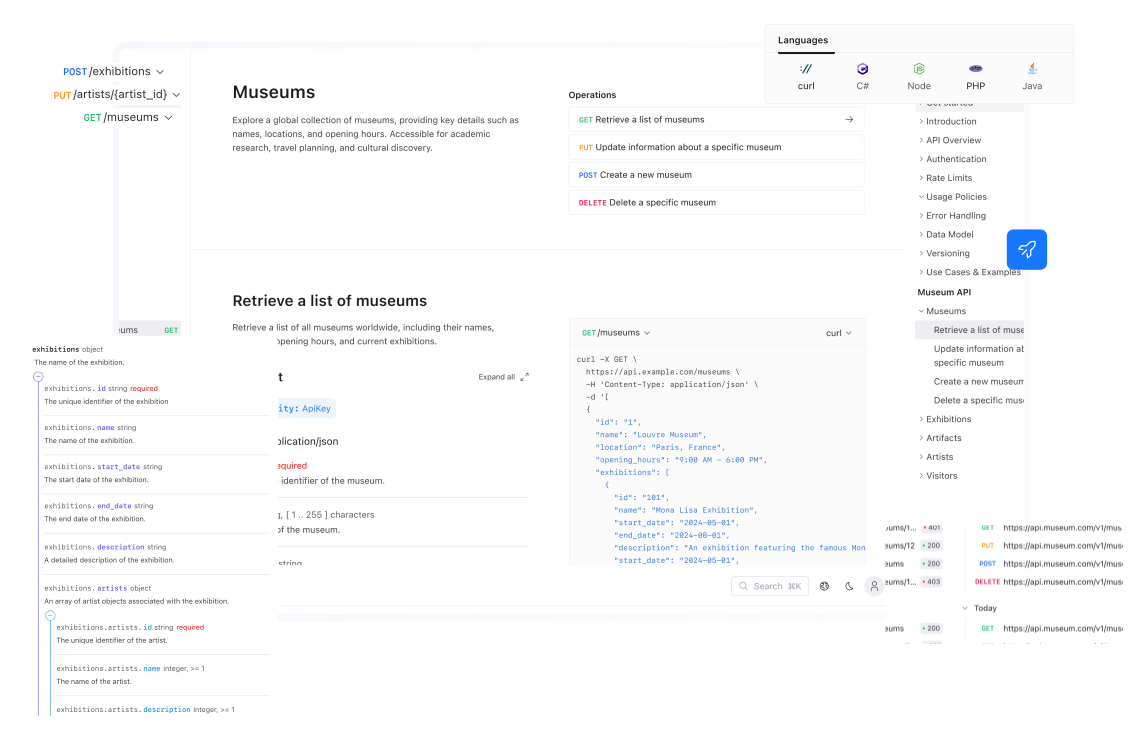
Screenshot:
Fern Documentation

4. Integrated Ecosystems#

Apidog#

Official Website: https://apidog.com/
Unlike the tools above which process a static OpenAPI file, Apidog's documentation is dynamic.
Screenshot:
Apidog Published Docs
Real-Time Sync: When you change a parameter in the API Design/Debug tool, the documentation updates instantly. No Git commit or build pipeline required.
Interactive: Includes a powerful "Try it out" console that shares environments with the mock server.

Comprehensive Comparison#

ToolCategoryKey StrengthBest ForRating
ApidogIntegratedReal-Time SyncAgile Teams / Full Lifecycle⭐⭐⭐⭐⭐
MintlifyPlatformAesthetics / MDXHosting Product Docs⭐⭐⭐⭐⭐
FernPlatformSDK GenerationTeams needing Libraries⭐⭐⭐⭐⭐
ScalarRendererModern UI + ClientModern Stack Teams⭐⭐⭐⭐
StoplightEditorGUI / No-CodeNon-technical Designers⭐⭐⭐⭐
RedocRendererReadability (3-Column)Public Reference Docs⭐⭐⭐⭐
Swagger UIRendererStandard / UbiquitousInternal Dev Testing⭐⭐⭐
Swagger EditorEditorSimplicityQuick Syntax Edits⭐⭐⭐

Key Takeaways#

Use Editors (Stoplight) to create the spec and Renderers (Redoc, Scalar) to view it.
Modern Hosted Platforms (Mintlify, Fern) treat documentation as a product, not an afterthought.
Next Step: Once you have a design, you can simulate it before coding using API Mocking Tools.
Modified atΒ 2025-12-29 03:35:08
Previous
Command Line Tools (cURL, HTTPie)
Next
API Mocking Tools
Built with